More Details
Block vs Inline Flow
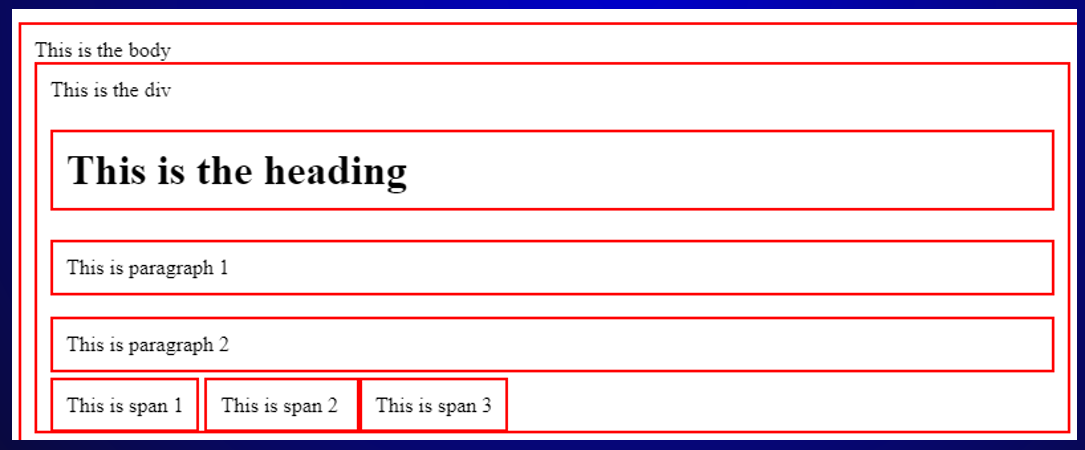
Elements of a HTML page generally flow in one of two ways: block or inline.
Block-Level
A block-level element will take up a full line, meaning that sequantial block-elements you write in your HTML code will appear directly beneath the previous one when displayed by the browser (unless we use CSS to change this).
Inline-Level
Inline elements will only take up as much space as required to fit the content they contain. This means that you can have multiple inline elements on a single line and you can even place them within block-level elements to have them appear on the same line.
<div> vs <span>
These are two generic contaners that hold content that illustrate the difference between block and inline level.
Targeting Specific Elements with CSS
If you want to apply a style to a specific element without applying it to all of that type of element you can use a class or ID selector. These styles can be applied to an HTML element by using the 'class' and 'id' attributes.
Class Selector
Targets a group of elements that you want to apply a specific style to. CSS class selectors start with a ".".
ID Selector
Targets one specific element that you want to have unique styling. CSS ID selectors start with a "#".
Relative vs Absolute Addressing
Absolute Reference
A complete URL that specifies the location of a resource from the root folder.
Example: "/sheridan/webdev/assignment2/html/moredetails.html"
Relative Reference
Specifies the location of a resource relative to the current document.
Example: "../css/style.css"
Source: https://medium.com/@TechWithMK/understanding-absolute-and-relative-references-in-html-710956749921